As a solopreneur, you are the CEO, marketer, and CFO all rolled into one. That’s a lot of hats — and one of them almost always gets ignored: your budget. But in 2026, AI has changed the game completely. You no longer need a finance degree or a costly accountant to run your money like a pro.
This guide breaks down exactly how to build an AI-powered budget as a solopreneur — step by step, tool by tool, and with a real-world case study to prove it works. Whether you’re a freelance designer, consultant, coach, or content creator, this is your financial blueprint.
| 57% of solopreneurs don’t use a formal budget ↗ FreshBooks Annual Report | 3.4x more likely to hit revenue goals with AI finance tools ↗ McKinsey State of AI | $8,400 average annual savings from automating finances ↗ Xero Small Business Report |
1. Understanding Your Financial Baseline as a Solopreneur
Before AI can help you, it needs raw material — your actual financial data. Most solopreneurs skip this step. They assume they know their money. They don’t. And that gap between perception and reality is where profits silently disappear.
Why Your Current Budget Is Probably Broken
Traditional budgets were built for salaried employees with predictable monthly income. Solopreneurs operate on variable income cycles — feast months, famine months, retainer clients, one-off projects. A static spreadsheet cannot adapt to that. AI can.
Here is what your financial baseline must include:
- Monthly revenue average — calculate your last 12 months, not just the last 3.
- Fixed costs — software subscriptions, insurance, rent if applicable, phone, internet.
- Variable costs — contractors, ad spend, tools you buy project-by-project.
- Tax reserve — self-employed people owe quarterly taxes. Most forget to budget for this.
- Profit margin — Revenue minus ALL costs, including your own salary.
| 💡 Pro Tip: Use the 50/30/20 rule adapted for solopreneurs: 50% of revenue for operations, 30% for growth (ads, courses, tools), 20% saved as profit + tax reserve. (Investopedia — https://www.investopedia.com/terms/s/50-30-20rule.asp) |
The AI Advantage: Pattern Recognition at Scale
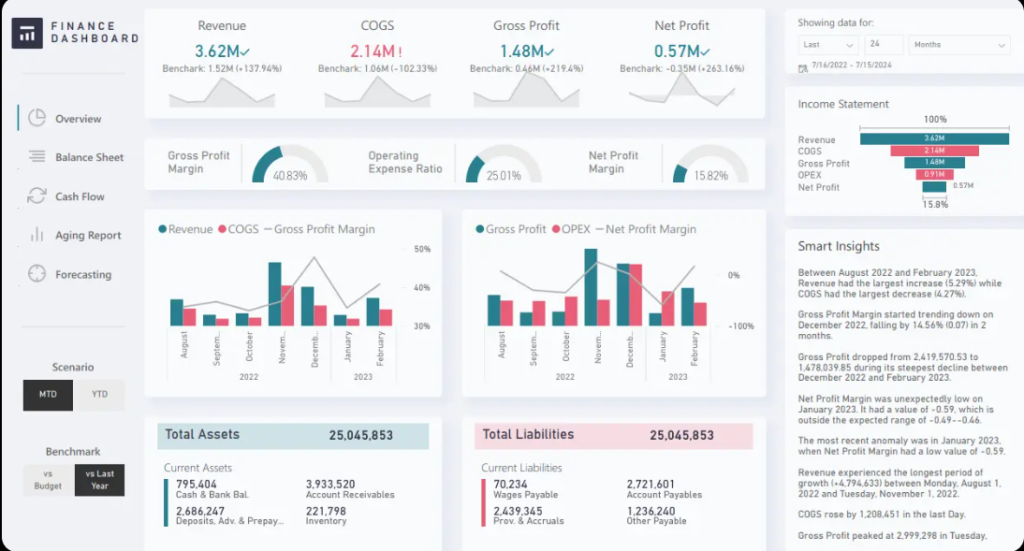
Where human brains see chaos in irregular income, AI sees patterns. When you feed 12 months of transactions into an AI tool, it will identify things you’d never spot manually: which client type pays the fastest, which month your expenses spike, and exactly when cash flow gets tight before you feel it.
This predictive power is the first and most important reason to go AI-first with your budget. It shifts you from reactive money management (checking your account when you’re worried) to proactive financial leadership (knowing three months ahead what’s coming).
2. Choosing the Right AI Budget Tools for Solopreneurs
Not all AI finance tools are created equal. Some are built for large enterprises and will overwhelm you. Others are too basic and won’t give you the intelligence you need. Here’s the curated toolkit for solopreneurs specifically.
| 🌊 Wave Accounting FREE Free AI-powered invoicing & expense categorization. Best entry point for new solopreneurs. | 📊 QuickBooks $30/mo Industry standard with AI insights, mileage tracking, and tax prep built in. |
| 🔵 Xero $15/mo Beautiful UI with AI bank reconciliation. Great for international clients. | 🤖 Claude / ChatGPT $0–$20 Use AI assistants to analyze expense exports & build custom budget templates. |
| 📑 Dext $20/mo AI receipt scanning that auto-categorizes every purchase. Eliminates manual entry. | 📈 Fathom $39/mo AI financial reporting & forecasting layer on top of Xero or QuickBooks. |
| ⚠️ Warning: Don’t over-tool yourself. Start with ONE accounting tool (Wave or Xero) + ONE AI assistant (Claude or ChatGPT). Add complexity only after you have 90 days of clean data. More tools ≠ better budgets. |
How to Stack These Tools Smartly
The magic isn’t in any single tool, it’s in how they communicate. Here is the ideal solopreneur AI budget stack:
- Bank account → Wave or Xero (auto-sync transactions daily)
- Receipts → Dext (AI scans and categorizes every expense automatically)
- Monthly data export → Claude or ChatGPT (ask for analysis, forecasting, anomaly detection)
- Reports → Fathom (visualize trends, profit by project, forecast next quarter)
This four-layer system takes about 3 hours to set up and then runs largely on autopilot, surfacing alerts and insights without you having to dig.
3. Building Your AI Budget System Step by Step
Now let’s get practical. Here is the exact 7-step framework to build a fully functional AI-powered budget, even if you’ve never tracked your finances before.
| 1 | Audit the last 90 days of transactions Export your bank and credit card statements as CSV. Don’t clean them yet. Dump the raw data — this is your truth baseline. |
| 2 | Connect your bank to Wave or Xero Link all business accounts. Within 24 hours, AI will auto-categorize 70–90% of your expenses. Spend 30 minutes reviewing and correcting edge cases. |
| 3 | Upload your CSV to Claude or ChatGPT Prompt: “Analyze this 90-day expense report. Identify my top 5 spending categories, highlight any unusual spikes, and suggest 3 areas I could reduce costs.” |
| 4 | Set income targets with AI forecasting Feed your last 12 months of revenue into your AI tool. Ask it to forecast the next 6 months using seasonal patterns. Set conservative and optimistic scenarios. |
| 5 | Build budget categories using AI suggestions Ask the AI to propose a budget allocation based on your revenue type and business model. Refine based on your goals, growth mode vs. stability mode require very different allocations. |
| 6 | Set automated alerts for overspend In Wave or Xero, configure alerts when any category exceeds your budget threshold by 10%. Early warnings prevent end-of-month surprises. |
| 7 | Run a monthly ‘CFO meeting’ with AI Export the month’s data, paste into Claude, and ask: “What worked this month, what didn’t, and what should I do differently next month?” This 15-minute habit is worth more than a bookkeeper. |
The Monthly AI Budget Rhythm
Consistency beats perfection. Here’s the minimal time investment that keeps your AI budget system working:
- Weekly (10 min): Scan your Xero/Wave dashboard. Approve any miscategorized transactions.
- Monthly (30 min): Full AI analysis via Claude or Fathom. Compare against targets. Adjust next month’s budget.
- Quarterly (90 min): Full financial review. Tax reserve check. Revenue projection recalibration. Set next quarter’s growth targets.
Real Case Study: How Sarah Turned $3,200/month into $8,700/month
| 🏆 REAL CASE STUDY Sarah Chen — UX Consultant, Austin TX Sarah was earning around $3,200/month in early 2024 — inconsistently — with no clear picture of where her money was going. She signed up for Xero ($15/month) and started using Claude to analyze her monthly exports. “Within the first month, Claude identified that I was spending $620/month on overlapping SaaS tools I barely used. I cancelled eight subscriptions that same week.” By feeding 18 months of invoice data into Claude, Sarah discovered that March, July, and October were consistently her lowest-revenue months. She proactively filled those gaps in advance. By Q4 2024, her monthly revenue had grown to $8,700/month — a 172% increase — not by working harder, but by working with a clearer financial picture. Her profit margin went from 28% to 51%. ↗ Read more at FreshBooks: https://www.freshbooks.com/blog/freelance-budget |
Conclusion: Your Money Deserves Smarter Tools
Building an AI-powered budget as a solopreneur is no longer a nice-to-have — it’s a competitive advantage. While your peers are drowning in spreadsheets or flying blind, you can have a financial system that thinks ahead, catches waste, and helps you forecast growth with confidence.
The solopreneurs winning in 2026 aren’t the ones working the hardest. They’re the ones with the clearest picture of their money. And now, AI gives you that clarity at a fraction of the old cost — sometimes for free.
Your Action Plan for This Week
1- Schedule a 30-minute CFO date on your calendar every month.
2- Sign up for Wave (free) at waveapps.com and connect your business bank account.
3- Export the last 90 days of transactions as a CSV file.
4- Open Claude and ask it to analyze your spending patterns.
5- Set 3 budget categories and 3 income targets for next month.