Stop letting invoicing eat your billable hours. These tools do the work for you — automatically.
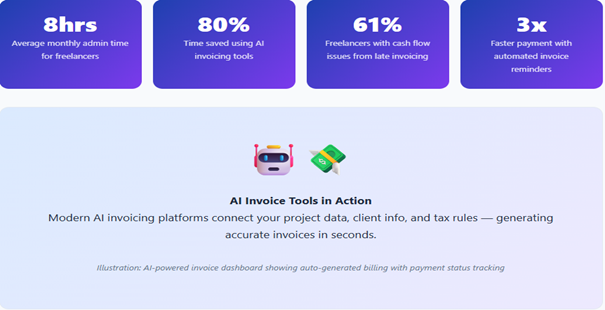
Quick Summary: Freelancers lose an average of 4–8 hours per month to invoicing admin. AI invoice generators can slash that by up to 80%. This guide covers the 7 best tools, their real-world benefits, and how to choose the right one for your workflow.
1. Why Freelancers Are Losing Money on Invoicing (And Don’t Even Know It)
You became a freelancer to do the work you love, not to spend Sunday evenings chasing unpaid invoices, reformatting billing templates, or manually calculating tax on every project. Yet here you are.
The truth is brutally simple: manual invoicing is silently killing your productivity. According to FreshBooks’ freelancing research, the average self-employed professional spends nearly 4–8 hours every month on administrative billing tasks. That’s time that could be billed out or, better yet, spent resting and growing.
And it gets worse. A study by Intuit found that up to 61% of small businesses (including freelancers) experience cash flow problems directly tied to late invoice follow-up. Manual invoicing leads to delays, errors, and awkward client conversations.
This is exactly where AI invoice generators come in. These tools don’t just create invoices, they learn your clients, suggest line items, auto-fill project data, send reminders, and even forecast your income. They’re not the future. They’re the present. And the freelancers using them are already ahead.
Let’s break down the 7 best AI invoice generators for freelancers in 2026 — tools that will give you back your time, reduce errors, and help you get paid faster.
2. The 7 Best AI Invoice Generators for Freelancers
1. FreshBooks AI Best Overall
Best for: Freelancers wanting an all-in-one solution
FreshBooks has long been a freelancer’s best friend, and its AI layer makes it even more powerful. The platform now uses machine learning to auto-categorize expenses, predict billable hours from time logs, and generate invoice drafts with one click. It even learns which clients pay late and nudges you to follow up proactively.
Pricing starts at $17/month. Their AI features are baked into every plan.
| Pros | Cons |
| Exceptional time-tracking integration | Pricier than some alternatives |
| AI auto-fills repeat client details | Limited client seats on the basic plan |
| Stripe & PayPal built in | |
| The mobile app is excellent |
Real Case Example: Maya, UX Freelancer — London
Maya was spending 6 hours a month manually creating invoices for 12 clients. After switching to FreshBooks AI, she set up templates once. Now the tool auto-generates invoices from her time logs every Friday. Her invoicing time dropped to under 20 minutes per month. “I used to dread Fridays,” she says. “Now my invoices send themselves.”
2. HoneyBook AI : Best for Creative Freelancers
Best for: Photographers, designers, and event-based freelancers
HoneyBook recently launched an AI assistant called “Copilot” that guides you through client onboarding, contract creation, and invoicing in one unified workflow. It learns your typical project scope and pre-fills invoice drafts based on contract details, cutting invoice creation time to under 2 minutes.
Pricing starts at $19/month.
| Pros | Cons |
| Contract + invoice in one flow | Less suited for hourly-rate work |
| AI Copilot reduces admin by 70% | Overkill for solo micro-freelancers |
| Stunning branded invoice templates |
3. Zoho Invoice (AI Mode): Best Free Option
Best for: Freelancers on a tight budget
Zoho Invoice is completely free for solo freelancers and now includes an AI assistant that suggests invoice line items based on past billing history, flags potentially incorrect amounts, and auto-sends payment reminders. For freelancers just starting, it’s an unbeatable value.
Pricing: $0 — completely free.
| Pros | Cons |
| Completely free forever | Limited third-party integrations |
| AI-powered smart suggestions | Steeper learning curve initially |
| Multi-currency support |
4. Wave AI: Best for Bookkeeping Integration
Best for: Freelancers who also need accounting
Wave has always offered free invoicing, but its AI upgrade, “Wave Advisor AI,” now helps you analyze cash flow patterns, predict which clients are likely to pay late, and auto-reconcile payments with your books. It’s the only tool on this list that combines invoicing + accounting AI in a single free platform.
Core features are free; AI add-ons from $8/month.
| Pros | Cons |
| Free invoicing + accounting | Limited customer support on the free tier |
| AI cash flow predictions | Fewer invoice design options |
| Automatic payment reconciliation |
Real Case Example: James, Freelance Developer — Toronto
James ran his entire freelance business on spreadsheets. When he discovered Wave AI, the platform automatically pulled in his bank transactions and matched them to invoices. Tax season went from a 2-week nightmare to a 2-hour process. “I literally cried tears of joy when my accountant said I had the most organized records she’d ever seen.”
5. AND.CO (by Fiverr): Best for Gig & Project Workers
Best for: Freelancers managing many small short-term projects
AND.CO was built specifically for the gig economy. Its AI automatically converts proposals and contracts into invoices the moment a project is marked complete. For freelancers juggling multiple short-term gigs, the automation is genuinely seamless — no manual entry required at all.
Free plan available; Pro from $18/month.
| Pros | Cons |
| Proposal-to-invoice automation | Limited accounting features |
| Built for freelance gig work | Less suited for long-term retainers |
| Clean, modern interface |
6. Bonsai AI: Best for Full Freelance OS
Best for: Freelancers wanting contracts, invoices, and taxes in one place
Bonsai is often called the “operating system for freelancers.” Its AI doesn’t just create invoices — it generates legally-sound contracts based on your project type, tracks time against those contracts, and then auto-creates invoices from that time data. Tax reporting is also automated based on your jurisdiction.
Starts at $25/month.
| Pros | Cons |
| Contract → time → invoice automation | Most expensive on the list |
| Automated tax estimates by country | Feature-heavy for newer freelancers |
| Excellent client portal |
7. Invoice Ninja (AI Pro): Best Open-Source Option
Best for: Tech-savvy freelancers who want full control
Invoice Ninja is an open-source invoicing platform with a powerful cloud version. Its AI Pro layer adds smart recurring invoice predictions, auto-payment matching, and natural language invoice creation. Just type “invoice Sarah $1,500 for web design, 30 days net,” and it builds the invoice for you.
Free (self-hosted) or from $12/month (cloud).
| Pros | Cons |
| Natural language invoice creation | Self-hosting requires tech knowledge |
| Self-hostable for full data control | UI feels less polished than rivals |
| Extremely feature-rich |
3. Side-by-Side Comparison: The 7 AI Invoice Generators
Here’s how all seven tools stack up briefly. Use this table to quickly match your needs with the right platform.
| Tool | Starting Price | Free Plan | AI Auto-Fill | Payment Integration | Tax Automation | Best For |
| FreshBooks AI | $17/mo | No | ✔ | ✔ Stripe, PayPal | ✔ | All-in-one users |
| HoneyBook AI | $19/mo | Trial only | ✔ | ✔ Stripe | Limited | Creatives |
| Zoho Invoice | Free | ✔ Free forever | ✔ | ✔ PayPal, Stripe | ✔ | Budget users |
| Wave AI | $0–$8/mo | ✔ | ✔ | ✔ Credit cards | ✔ | Bookkeeping needs |
| AND.CO | $18/mo | ✔ Limited | ✔ | ✔ PayPal, Stripe | No | Gig workers |
| Bonsai AI | $25/mo | Trial only | ✔ | ✔ All major | ✔ International | Full business OS |
| Invoice Ninja | Free / $12/mo | ✔ Self-hosted | ✔ Natural language | ✔ 40+ gateways | ✔ | Tech-savvy users |
4. How to Choose the Right AI Invoice Generator
With so many strong options, the best tool isn’t the most popular one — it’s the one that fits your workflow. Here’s a simple framework to decide:
Step 1: Identify Your Biggest Pain Point
Are you spending too much time creating invoices from scratch? Choose FreshBooks or Bonsai for smart auto-generation. If late payments are killing your cash flow, prioritize tools with automated reminders — Wave and FreshBooks both excel here. If you’re on a tight budget, Zoho Invoice is free and surprisingly powerful.
Step 2: Check Your Integrations
Do you use Notion, Asana, or Trello for project management? Check whether your chosen invoice tool can pull data from these apps. Zapier-compatible tools like Bonsai and FreshBooks connect to almost everything. If you primarily work through Fiverr or Upwork, AND.CO has native gig platform integrations.
Step 3: Consider Your Location & Tax Needs
If you’re based outside the US, for instance, in the EU, UK, or Germany, you need a tool that handles VAT, GST, or regional tax rules automatically. Bonsai and FreshBooks both handle international tax compliance well. According to OECD tax research, freelancers who mis-invoice VAT face penalties averaging €1,200 per year. Don’t skip this step.
Pro Tip: Most of these tools offer a 14–30 day free trial. Start with Zoho Invoice (free forever) to get a feel for AI invoicing. Then upgrade to FreshBooks or Bonsai once you’re ready for more advanced automation.
A Note on Security
All seven tools on this list use industry-standard 256-bit SSL encryption and are compliant with GDPR and major data protection laws. Your financial data and client details are safe. Always check for SOC 2 compliance if you handle enterprise clients — FreshBooks and Bonsai are both SOC 2 certified.
Absolutely. All seven tools in this guide integrate with at least one of Stripe, PayPal, or major credit card processors. FreshBooks and Bonsai support the widest range of payment gateways. Clients can pay directly from the invoice link with just a few clicks.
Do I need technical skills to set up an AI invoice generator?
Whether you’re a graphic designer, developer, copywriter, photographer, or consultant, AI-powered invoicing is one of the highest-ROI investments you can make in your freelance business. The tools have never been more capable, more affordable, or more user-friendly than they are right now in 2026.
Start with a free tool like Zoho Invoice or Wave if you’re testing the waters. Graduate to FreshBooks or Bonsai when you’re ready for full automation. And remember: your time is worth more than any subscription fee. The right AI invoice generator pays for itself in the very first month.
Have a tool we missed? Drop it in the comments or share this post with a fellow freelancer who’s still invoicing manually. They’ll thank you for it.